
The Tarjan Center would like to thank Patrick Burke and Lloyd Nicks at UCLA’s Disabilities and Computing Program (DCP) for their expertise and support as we improve accessibility within our center, and for assisting us with the development of these Guidelines. We would also like to thank the Tarjan Advisory Committee for their input and comments on this document. We also acknowledge the work of Danny Chalfen, who founded the DCP in 1984 for his leadership and guidance to the Tarjan Center and UCLA regarding accessibility for people with disabilities.
The Tarjan Center at UCLA is a federally designated University Center for Excellence in Developmental Disabilities and is part of a network of 67 Centers around the United States and territories. The Tarjan Center is a catalyst for collaboration, innovation, and systems change to advance the self-determination and inclusion of people with disabilities. We are a resource to UCLA and to national, state, and local policymakers, professionals, and individuals with disabilities and their families. Central to our work is the sharing of what is learned through our research, evaluation, training, and model programs.
Creating an integrated and inclusive environment where people from diverse backgrounds and abilities are valued and supported is paramount to the work of our Center. We are committed to making sure that people with disabilities have the same access to and use of websites, electronic information, publications, and information for which the Tarjan Center is responsible. Towards this end, we have created these Accessibility Guidelines to implement both the spirit and requirements of the ADA/504 in order to produce documents and presentations in a way that makes information easily accessible to a wide range of audiences. While this document is intended to help Tarjan Center faculty and staff, we hope the information will be of use to the UCLA community, our collaborators, and stakeholders.
We created these Accessibility Guidelines to improve the dissemination efforts of the Tarjan Center so that individuals with a variety of learning styles and sensory, physical, and cognitive needs can access and use our materials more quickly, easily, and independently. The work of the Tarjan Center engages diverse audiences who may need to be able to access our information in a variety of ways. For example people who are blind may use a screen reader, people with cognitive disabilities may require plain language, and people with physical disabilities may use an adapted keyboard. For the purposes of these guidelines, and consistent with the ADA, 504, and 508, we define “accessible design” as a process in which the needs of people with disabilities are specifically considered in the services and products produced to ensure that communication with people with disabilities is equally effective as communication with people without disabilities (Do-It 2013; DOJ, ADA Requirements: Effective Communication, 2014). Our presentations and events should also reflect inclusiveness for all.
How should this information be used?
Use this guide when creating internal and external print and electronic documents such as:
This section briefly reviews federal laws and their requirements that ensure equal opportunity for people with disabilities. Within each section, there is a brief description of the legislation with links to more detailed information about each of the legal requirements. Of specific relevance to the Accessibility Guidelines are the laws, standards, and regulations that pertain to communication access.
Section 504 of the Rehabilitation Act and the Americans with Disabilities Act
Both Section 504 of the Rehabilitation Act of 1973 (as amended) and the Americans with Disabilities Act (ADA) are civil rights laws that prohibit discrimination against people with disabilities and ensure equal opportunity in the area of employment, public services, transportation, public accommodations, and telecommunications. The Rehabilitation Act prohibits discrimination on the basis of disability in programs conducted by federal agencies, in programs receiving federal funding, in federal employment, and in the employment practices of federal contractors. Built upon the foundation created by 504, the ADA goes further by expanding the covering entities to state and local governments (Title II), and businesses and nonprofit organizations that serve the public (Title III). Both 504 and the ADA require effective communication and the provision of auxiliary aids and services, such as real-time captioning, enlarged text, or electronic document. “The purpose of effective communication rules is to ensure that a person with a vision, hearing or speech disability can communicate with, receive information and convey information to, the covered entity” (ADA Requirements: Effective Communication. See also 2011 DOJ Revised ADA Tile II and Title III Regulations).
Section 508 of the Rehabilitation Act
Section 508 of the Rehabilitation Act (1998) requires that federal agencies’ electronic and information technology be accessible to people with disabilities. They serve as a model for standards by educational institutions in the design of accessible technology. Section 508 contains technical criteria specific to various types of technologies such as software applications and operating systems, web-based information and applications, computers, telecommunication products, video and multi-media. Information about assistive technologies and accessibility under Section 508 is available at section508.gov.
UCLA-Based Accessibility and Compliance Resources
The following serve as general guidelines that are useful across electronic and printed materials and products. However, it is advised that you always ask your audience their preferred method of communication and preferred format. Within each section the key actions are identified followed by additional implementation guidelines.
Use simple, universal fonts like Arial or Verdana at a 12-point minimum. Large print documents should use an 18-point font size.
Check for the following:
Color contrast can have a major effect on how your document or presentation is experienced.
Check for the following:
Materials should be designed with clear margins and spacing so that the reader feels a sense of ease in finding the beginning of the next line.
Check for the following:
Your materials should reflect the diversity of your intended audience and be responsive to the community you are trying to reach. This means that images should include pictures of people with disabilities, different cultural groups, and people of all ages. Avoid background graphics. Images should have captions, and must have alternative text unless they are purely decorative.
Check for the following:
Captions are used to contribute to or enhance the storytelling. They are often used to connect an image with the narrative.
Alternative Text (alt-text) is text that serves the same purpose and conveys the same essential information as the image itself. Context is key when writing alt-text: including “why” can give more meaning than just describing the “what” of an image. This means that alt-text for the same image may be different based on the context and surroundings of the image itself.
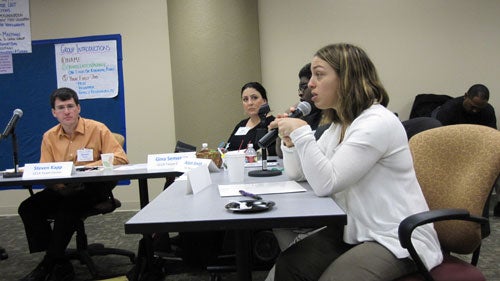
Caption: Youth advisor contributing to group discussion at a CECY meeting.
Alt-text: Youth Advisor speaking into a microphone at a CECY meeting.
Check for the following:
Use plain English and short sentences to convey your message. You want to communicate information that is technically accurate and also understandable.
Check for the following:
It is important that your audience is aware that your documents, as well as your events, are accessible. One way to do this is to include access symbols on the documents and at your events. Below are examples of access symbols that are also useful to advertise accessibility.

Access symbol of a moving wheelchair.

Access symbol indicating that large print is available.

Access symbol indicating that open captioning is available upon request.
More information on the new moving wheelchair accessible symbol. Download any of the 12 accessibility symbols.
The source material of your document’s text matters. Do not use text that is embedded in a graphic. Text may not remain as text when you paste it from one document into another, especially across applications. Text can be converted into an image or bring unwanted formatting codes into the final document. The more you re-use text via copy and paste, the more it can be corrupted. Using “styles” will help with consistency and structure in your document.
Check for the following:
Word has built-in tools that can help you format an accessible document as you are creating the document itself. It is best practice to create with accessibility in mind, rather than to create a document and then rework it to be accessible.
Check for the following:
Excel charts should have alt-text that states not only what your charts are showing, but also what they are saying (i.e., what a sighted person would interpret about what they see on the chart). Keep your worksheets simple and clear for screen readers. (This section is largely drawn from the California Department of Rehabilitation’s Disability Access Services’ “Seven Steps to Creating an Accessible Excel Worksheet.” More at the Disability Access Services Website).
Check for the following:
Consider that every aspect of a dynamic PowerPoint – its text, graphics, tables, charts, videos, audio – should be accessible to all. Consider readability and color contrast for your slides, particularly if they will be presented at live events where people will be seeing them from a distance. (Guidelines, resources, and sample templates for accessible PowerPoints and Presentations are available from the American Public Health Association at (https://www.apha.org/events-and-meetings/annual/presenter-information/oral-session-guidelines/access-information-for-presenters).
Check for the following:
Desktop Publishing Programs are used to create graphic materials (e.g., flyers, newsletters, brochures) that are typically converted to PDFs for use and distribution. If an outside graphic designer is creating your material, you may want to ask if they know how to build in document accessibility for screen readers. Otherwise, you will need to “remediate” the document after it is created to make it accessible. Microsoft Publisher and Acrobat InDesign are two popular desktop publishing programs used to create graphic material.
Word, Excel, and PowerPoint files, among others, are increasingly being converted into PDFs before being distributed or posted. Unfortunately, many of us do not realize how the method we use to convert a file to a PDF may serve or disserve its accessibility. You should always test your document’s accessibility after converting it.
Check for the following:
Emails sent to a listserv or eblasts to distribution lists that people can join on your website are examples of web-based material that need to routinely incorporate elements of accessibility, including alt-text for images and descriptive hyperlinks.
Check for the following:
Online registration pages and web-based surveys are examples of online forms that need to reflect that all are invited to participate. They should be designed with correct markup to be accessible via adaptive technologies. See this WebAIM.com resource on creating accessible forms.
While instruction on how to create an accessible website is beyond the scope of these guidelines and not applicable to most Tarjan Center faculty and staff, it is important that you have a basic understanding of what comprises a website that is accessible to people with disabilities including but not limited to those with visual, auditory, physical, speech, cognitive and neurological disabilities.
Check for the following:
It is important to create events that are a welcoming and inclusive experience for all. Addressing accessibility in your marketing and advertising, as well as at the event itself, sends a signal to people with disabilities that they are included and that their necessary accommodations have been considered.
Beginner Level
Advanced Level
Beginner Level
Advanced Level